

- Μηνύματα
- 2.575
- Reaction score
- 13
Μετατρέψτε αυτό τον φαντασικό simulator σε ακόμη πιο ρεαλιστικό.Πως μπορεί να βελτιωθεί ακόμη πιο πολύ η ήδη τρομερή αίσθηση που σου δίνει το παιχνίδι;Πολύ απλά : βλέποντάς το σε περισσότερες από 1 οθόνες με αποτέλεσμα την διεύρυνση της γωνίας θέασης!!! Δείτε παρακάτω πως μπορεί να γίνει αυτό.

Μιλάμε για δυνατότητα που δεν έχω ξαναδεί σε παχνιδομηχανή και πραγματικά η εμπειρία (σε συνδυασμό και με μια τιμονιέρα) πρέπει να απογειώνεται στα ύψη.How to Set Up Immersive Multi-Screen Madness
Raced in an arcade lately? Some of the best arcade racing machines are immersive simulators -- games where you lower yourself into a seat and watch the race on multiple screens wrapped around you. Theres just something about looking to the left and right as you pass other cars, watching as the walls of the track blur past you. You can almost feel the momentum when you look around the corner of your next turn. Of course, you dont need to buy an arcade machine to recreate this experience. If you already own Forza Motorsport, you might want to know about a hidden extra feature this game has .
I have some extremely good news for you: Anyone who knows how to hook up an Xbox over System Link can set up that same kind of simulator at home. By linking up multiple Xboxes and television screens, you can create a wrap-around, panoramic view. Its a feature called the Network Cockpit. Take a look:
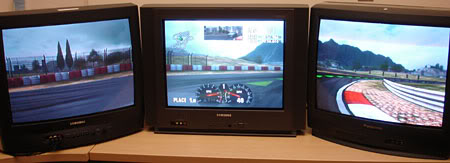
Distant terrain features on the Test Track
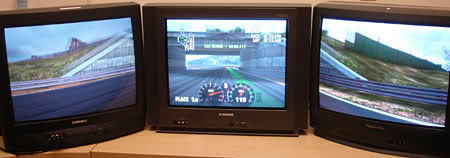
Going underneath an overpass on the Test Track
With multiple screens, this racing simulator feels even more like a simulation. On Fujimi Kaido, the track tilts back and forth as you drift through turns. On New York II, billboards flash all around you as you rush through Times Square. Test Track II takes on new depth when you can see all the way into a hairpin turn before you take it. Mountains loom in the distance from the Alpine Ring. When youre surrounded by a pack of cars, you can watch all around you as you defend your position.
Even the sounds change, expanding what you hear to the far left and far right: the rattling of a chain link fence as another car slams into it, the rush of cars on a nearby track passing in the opposite direction, and the thunderous sound of a muscle car struggling to pass you.
Heres what youll need to set up multi-screen madness:
1) Two to four Xboxes. (If you dont own that many machines, invite some friends over and borrow theirs.)
2) A copy of Forza Motorsport for each Xbox. (See point #1. If you like, you can rent extra copies just to test them out ... or tell all your friends to buy the game.)
3) A television for each Xbox.
4) The same Ethernet cables and hub you would normally use for System Link.
If youve never used System Link, you can read how to set it up here. http://www.xbox.com/en-US/expertguide/lanparties.html
Basically, each Xbox needs an Ethernet cable that runs towards the central hub. Youll be moving the televisions later, configuring them for your wrap-around screen.

Billboards and neon on the New York Circuit
The next few steps work like this:
1) Make sure youve got a copy of Forza Motorsport in each Xbox and confirm that all of the Xboxes are hooked up through System Link. Check to verify youve got a television hooked to each Xbox. Turn on all the Xboxes and televisions.
2) Youre going to pick one Xbox as the host. When you race with multi-screen, you can access all the cars that are saved on that Xbox.
3) Select the Options menu then scroll to the bottom of the menu. Then push the left thumbstick down and scroll down to a hidden option on the screen. Youll see the words "Network Cockpit Settings" at the end of the list.
4) From there, you can select your main Xbox as the host. Choose a channel number.
5) Run through the same routine with your additional Xboxes, deciding whether you want a left-hand, right-hand, or rear view for each screen. Every screen for the same car should have the same channel number. For example: You could decide to select one Xbox as the host on channel 0, and then set up a second Xbox with the rear view on channel 0.
6) Hit the X button to apply and save the set up for each one. After you exit the menu, restart all the Xboxes.
7) When you restart the game, youll see a popup screen with the words Multiscreen Startup on each television. Your Xbox needs 15 seconds to reconfigure. If you want to change the set up, select Cancel. Otherwise, let it run its course.
8) Youll see the usual Forza Motorsport menu on your host screen. Each other screen has a message starting with the words Status: Connected as . Each other screen will tell you what point of view its set for when it verifies its connection.
9) After the machines sync up, play Forza Motorsport on the host machine, jumping into Arcade Race, Career Mode, Time Trial, or whatever!
10) For added immersion, change the room around your set up. Adjust your chair relative to the screen. Run your sound through stereo speakers. Hook up a steering wheel and pedals. Place fuzzy dice over the television. Put a bobble head on your dashboard. You may think were joking, but a good racing set up is worth sitting in for hours and hours.
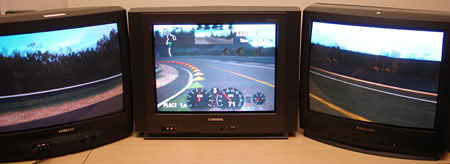
The winding roads of Fujimi Kaido
Once youre off and racing, you can watch the host screen from the cockpit view or (if you prefer) hit the black button for a third-person view of your car. Some of the obvious set ups work like this:
1) Use a big screen as the host screen with a front view. Use a second, smaller screen for a wider rear view mirror.
2) Put the host screen in the middle, flanked by the left view on one side and the right view on the other.
3) Set up multiple cars on multiple channels. For instance, you could use a front and rear view for one car on channel 1, and then add a front and rear view for a second car on channel 2.
4) Set up one of your Xboxes as a Replay Camera. While you race, that screen will cycle through different views of the race, showing a car from different points of view. The camera watches the car on its same channel (so if youre on channel 0, the channel 0 camera will focus on your car).
5) If youre really ambitions, host a LAN party with multiple drivers on multiple screens, along with Replay Cameras for spectators. (As of this writing, were still testing how far we can push this limit.)
Want to get tricker? If you have Xbox Live, and you've got one host machine on your hub, run an Ethernet cable from your hub to your broadband connection. Thats right. You can then race with multiple screens over Xbox Live! Only the cars in front of you will have GamerTags above them, but you can still see other racers on your other screens. If youre already a good driver, the extra screens make it easier to see where you are when you maneuver for position.
We know some folks are already rearranging their living rooms for online racing. If youre racing with multiple screens, take a minute to snap a digital picture of your multi-screen set up. Were setting up a message board for the Forza Motorsport Community site, and wed like to see how you race. Now that you know about this option, well also be looking for you on Xbox Live looking to the left, the right, in front, and behind us


