
argi
"Επαγγελματίας"
- Μηνύματα
- 30.020
- Reaction score
- 6.881
The Hookup
The M-Vision Cine LED arrived shortly before I was to take off for another projector manufacturer's press event, showcasing their involvement with a famous Hollywood filmmaker as well as the unveiling of their own LED based projector. Not wanting to waste any time, I unpacked the M-Vision Cine LED and placed it atop a large bookcase in the back of my main theater. Normally, I mount all the projectors I get in for review to my ceiling; however since I was only going have a short time with the M-Vision Cine LED I didn't want to have to go through the hassle of having to remove it a few weeks later. By installing the M-Vision Cine LED atop my bookcase I was able to directly compare its LED system against my reference projector, the Anthem LTX 500 LCOS (D-ILA), which uses a traditional lamp for its illumination but also retails for about half as much as the M-Vision Cine LED.
Installing the M-Vision Cine LED atop my bookcase was easy enough, though if you prefer to ceiling mount your projectors I'd recommend employing the help of a friend or better still your dealer when installing the M-Vision Cine LED. Once placed, I connected the M-Vision Cine LED to my Integra DTC 9.8 processor via a HDMI cable from Transparent Cable. I connected the M-Vision Cine LED to the Integra's second HDMI monitor out, which would allow me to toggle between the M-Vision Cine LED and my Anthem projector with ease.
I currently have two screens in my reference theater; one being an 80-inch SI Black Diamond high contrast screen and the second being a 92-inch Screen Research drop down, which is made from a unity gain material. Because of how I had to install the M-Vision Cine LED I was unable to zoom the image far enough in to properly fill my 80-inch SI Screen so I used my larger Screen Research screen for the bulk of the review, switching between the two screens for focused tests and spot checking.
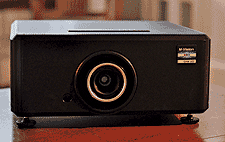
Once I had the M-Vision Cine LED placed and aligned to work on both screens it was time for calibration. The M-Vision Cine LED's zoom, offset and focus controls are all manual, as they should be. Image offset both horizontally and vertically is done via an included Allen wrench which is "plugged" into one of two small holes atop the projector's case but behind a small trap door that otherwise brandishes Digital Projection's logo. I got the image pretty much centered without having to use too much image offset, which as many of you are aware introduces keystoning. The M-Vision Cine LED offers no keystone correction of any kind for it would degrade the image quality and that's just not something Digital Projection is willing to do. A few twists of the Allen wrench here and there and I had a perfectly aligned image without any visible keystoning effects present. Next, I zoomed the image in and out until I had the edges butting right up to black fabric and velvet surrounds of both screens. From there I was able to access one of the M-Vision Cine LED's included test patters to dial in the focus. This entire process from un-boxing the M-Vision Cine LED to getting the image sized and focused appropriately took roughly 10 minutes.
Next, I fired up my Digital Video Essentials calibration disc on Blu-ray and began cycling through the various test patterns and pull-down tests as I dialed in the M-Vision Cine LED's black and white levels as well as color. I must say, out of the box, the M-Vision Cine LED is quite impressive and required only minor adjustments in my system before I was ready to begin my evaluation.
I would also like to point out that the M-Vision Cine LED has no "Dynamic" or "Movie" settings of any kind, which I appreciate for it lets me know that Digital Projection isn't using any digital trickery to "enhance" their image quality; instead their image simply is quality. You can create your own presets or modes and save them to the M-Vision Cine LED's memory but your starting point is always going to be the same.
Furthermore, features such as dynamic contrast and enhanced blacks are also largely absent, though the M-Vision Cine LED does offer two settings that mimic a dynamic contrast mode as well as enhanced black levels, though they're nowhere near as invasive as what you'll find in lesser, traditional HD projectors. Truthfully, they're somewhat difficult to find in the M-Vision Cine LED's menus, so I get the feeling Digital Projection would rather you not use them at all. I didn't, and neither should you. Also, the M-Vision Cine LED features no auto motion or 120Hz video processing that's become all the rage these days among HDTVs and even budget projectors, thank you Jesus.
Performance
I've recently been involved in several conversations surrounding the differences between high-end home theater projectors and commercial grade digital cinema projectors and how the differences are becoming increasingly subtle outside of overall resolution. To test my theory I cued up Pearl Harbor on Blu-ray (Disney) and chaptered ahead to the scene where President Roosevelt, played by Jon Voight, is discussing retaliation options with his cabinet and joint chiefs. This may not seem like a likely sequence in which to test a projector's image quality given the spectacular 40-minute attack sequence that precedes it, but it's rife with nuances that test everything from black level detail, image detail, color saturation, contrast and edge fidelity. Plus I like this scene because I've actually seen it in its raw, in-camera form, on through to its final theatrical master.
Starting with black level detail and contrast, the scene via M-Vision Cine LED held true to the theatrical master. Voight's suit in the scene is not black, but instead a very rich, dark shade of gray made of large wool fibers in a somewhat ungainly weave that appears, at times, to have a pinstripe like appearance. Through the M-Vision Cine LED, Voight's suit was rendered with all of the textures and imperfections intact and appeared as it did in the theatrical 35mm master I saw at one of the many post production houses charged with preparing Pearl Harbor for its theatrical release. Even in the shadows (remember the scene is largely edge lit) the weave, texture and even stitching were visible from my primary viewing position. In terms of sheer detail, another great test can be found in this scene. Across the table from Voight sits one of his Admirals who is largely in darkness. Lesser projectors are unable to show a clear distinction between the edge of his uniform and the surrounding darkness, not to mention individual red threads that make up his various military decorations worn over his left vest pocket, two items which the M-Vision Cine LED picked up on and rendered faithfully.
Skin tones and textures throughout the scene were rendered beautifully and naturally with detail reaching the pore level on the actor's faces. While I'd classify the scene as warmer in nature, favoring the yellow end of the color spectrum, the M-Vision Cine LED was still able to strike the appropriate balance among the scene's other, lesser hues like subtle blues and greens, without basting them in an overall sepia tone. White levels were also rendered with aplomb, maintaining strict composure even when blown out without leaning too far to either the warm or cool end of the color spectrum. There were a few instances where the whites picked up a more cool hue, but this was deliberate and part of the director and colorist's intent and not the result of the M-Vision Cine LED being cool in nature.
Switching gears, I cued up the Fifth Element on Blu-ray (Sony Pictures), which I swore I'd never do; however it was fresh in my mind having come from a competitor's demo so I wanted to see how the M-Vision Cine LED stacked up. I chaptered ahead to the scene featuring Milla Jovovich walking along the edge of a large skyscraper marveling at all the flying cars. We've all seen this particular scene hundreds if not thousands of times, that it's probably permanently etched in our subconscious. Well, and I know this is going to sound cliché, but you ain't never seen it like this. Through the M-Vision Cine LED the detail, color, depth, edge fidelity and motion were crazy good and made the previous demo I saw on a far costlier projector look as if it was being shown on one of those new pocket sized projectors. The sheer depth displayed in the image was insane and at times had me questioning the need for 3D. Who needs glasses and expensive ancillary equipment when you can get 3D-like depth and dimension (no, it doesn't pop out at you) with boring old 2D HD? I never use or watch The Fifth Element when reviewing anything these days, however with the M-Vision Cine LED in my system I remained seated for the entire movie.
I ended my critical evaluation of the M-Vision Cine LED with Pandorum starring Dennis Quaid and Ben Foster on Blu-ray (Anchor Bay). Pandorum is a sci-fi horror thriller about a voyage into the cosmos gone horribly awry. The film features a wide variety of color palettes ranging from black and teal to arid yellow and brown, depending on which part of the ship our characters find themselves. Motion plays a large role in the film, for the antagonists are captured in a quasi stop motion-like manner, which is visually jarring and emotionally unsettling. Starting with the color, which regardless of hue is always overly saturated in Pandorum, the M-Vision Cine LED didn't disappoint and proved to be the best showcase of its DLP/LED makeup by far. Black level, contrast and detail were again superb. Motion, be it camera or in camera was natural and smooth with no signs of artifacts around the edges. In camera movements, especially those of the antagonists, were appropriately jarring and stilted as per the director's intent, something motion processing and uber high refresh rates seek to eliminate.
In terms of overall performance I found the M-Vision Cine LED to be a superb overachiever, one capable of displaying the filmmaker's true vision without any unnecessary enhancements or gimmicks. Standard definition material, be it DVD or broadcast was also impressive and far more natural and analog in nature than through LCD based projectors, evident when watching 21, starring Kevin Spacey on DVD (Sony Pictures) and viewing old episodes of 24 (Fox) via my AppleTV. The M-Vision Cine LED won't make SD look like HD but it doesn't make it unwatchable either.
Lastly, I'd like to touch upon the M-Vision Cine LED's light output, which seems to be a bit low at 600 Lumens by today's standards. I found the M-Vision Cine LED's light output to be more than adequate and at times even a bit much in my room. Throughout my time with the M-Vision Cine LED I got the feeling it wanted a bigger screen that the two I had on hand. While I wouldn't recommend using the M-Vision Cine LED with a screen larger than say 140 inches, I wouldn't shy away from it either, for its 600 Lumen rating feels conservative even on my unity gain screen. In comparison to my Anthem projector, which is rated at 900 Lumens, the M-Vision Cine LED was noticeably brighter on both my SI and Screen Research screens from the same distance. Speaking of screens, the M-Vision Cine LED performed beautifully on my unity gain Screen Research screen, which is bound to please the purists out there. However, when viewing material on my high contrast SI Screen the image was taken to another level. Though it did crush the blacks a bit, the added pop and perceived brightness more than made up for it. Ultimately, I ended up calibrating the M-Vision Cine LED for both screens and saving them as separate user presets for on-the-fly comparisons. For myself, I preferred the M-Vision Cine LED/SI Black Diamond combo and would welcome the chance to demo both on a much larger scale-hint-hint.
The Downside
The on-screen menus are oddly laid out, making the appropriate selections tricky at times thanks to their highlighting method. The menus are largely a middle shade of gray with the text falling either slightly lighter or darker than the surrounding window; however when you highlight something it either becomes marginally lighter or darker than what it was before, making you wonder if you've selected anything at all.
I would've liked to have seen some sort of motorized or automated lens cover on the M-Vision Cine LED. Motorized lens covers are becoming more and more common among even budget projectors and while noisy and slow, they really do help keep your optics clean.
The M-Vision Cine LED does take a fair amount of time to warm up and lock onto an incoming signal. In comparison to my Anthem projector the M-Vision Cine LED took, on average, 10 seconds longer to lock onto an incoming signal via HDMI. It's not the end of the world, nor is it a problem exclusive to the M-Vision Cine LED; it just takes a bit longer than most. On the flip side, once the M-Vision Cine LED has locked onto said signal it is far more stable, something I was able to test thoroughly thanks to my craptastic AT&T U-Verse service.
Conclusion
The M-Vision Cine LED from Digital Projection is not an entry-level projector. The M-Vision Cine LED, with its roughly $16,000 asking price, is a decidedly high-end affair aimed at the discriminating home theater enthusiast and/or videophile. That being said, with its longer than thou lamp life (60,000 hours) and superior optics, it very well may be the last projector a potential customer would buy, which if you break it down makes it a far greater value proposition that say a mid-level projector ($6,000).
An average mid-level projector using a traditional lamp will run approximately 2,500 hours (if you're lucky) before needing to be replaced. 2,500 hours at a retail price of $6,000 means you're paying $2.40 per hour where as the M-Vision Cine LED will run you 27 cents. Now I know this comparison is a bit like comparing apples to oranges but consider that a replacement lamp on said mid-level projector will set you back $369.00. You'll replace a traditional lamp 24 times to equal the M-Vision Cine LED's 60,000 hour reported lifespan; 24 times $369 equals $8,856 making the total cost of ownership for the mid-level projector almost equal to that of the M-Vision Cine LED. At eight hours a day times 365 days in a year you'll be replacing the lamp on a traditional projector every year versus every 20 or so with a M-Vision Cine LED. Add in the fact that a mid-level projector can't hold a candle to the M-Vision Cine LED in terms of image quality and you begin to see what I'm on about.
Now, I'm not trying to make a case not to buy a mid-level projector or even a projector that you can afford right now. However, if you're in the market for a serious piece of videophile pornography and are considering projectors in the $8,000 to $12,000 range, I'd urge you to demo the M-Vision Cine LED, for it may be worth it to you to save up a few more pennies until you can afford it. If you're shopping for a true cost-no-object projector, one that can reach prices in excess of $25,000 or more, I'd also urge you to check out the M-Vision Cine LED, for it has the potential to save you money both now and in the long term, not to mention it will probably embarrass costlier rivals in terms of sheer performance.
If it were my money I'd be hard pressed to justify spending more or looking beyond the M-Vision Cine LED from Digital Projection, for I found its performance and daily livability in my system to be virtually beyond reproach
The M-Vision Cine LED arrived shortly before I was to take off for another projector manufacturer's press event, showcasing their involvement with a famous Hollywood filmmaker as well as the unveiling of their own LED based projector. Not wanting to waste any time, I unpacked the M-Vision Cine LED and placed it atop a large bookcase in the back of my main theater. Normally, I mount all the projectors I get in for review to my ceiling; however since I was only going have a short time with the M-Vision Cine LED I didn't want to have to go through the hassle of having to remove it a few weeks later. By installing the M-Vision Cine LED atop my bookcase I was able to directly compare its LED system against my reference projector, the Anthem LTX 500 LCOS (D-ILA), which uses a traditional lamp for its illumination but also retails for about half as much as the M-Vision Cine LED.
Installing the M-Vision Cine LED atop my bookcase was easy enough, though if you prefer to ceiling mount your projectors I'd recommend employing the help of a friend or better still your dealer when installing the M-Vision Cine LED. Once placed, I connected the M-Vision Cine LED to my Integra DTC 9.8 processor via a HDMI cable from Transparent Cable. I connected the M-Vision Cine LED to the Integra's second HDMI monitor out, which would allow me to toggle between the M-Vision Cine LED and my Anthem projector with ease.
I currently have two screens in my reference theater; one being an 80-inch SI Black Diamond high contrast screen and the second being a 92-inch Screen Research drop down, which is made from a unity gain material. Because of how I had to install the M-Vision Cine LED I was unable to zoom the image far enough in to properly fill my 80-inch SI Screen so I used my larger Screen Research screen for the bulk of the review, switching between the two screens for focused tests and spot checking.
Once I had the M-Vision Cine LED placed and aligned to work on both screens it was time for calibration. The M-Vision Cine LED's zoom, offset and focus controls are all manual, as they should be. Image offset both horizontally and vertically is done via an included Allen wrench which is "plugged" into one of two small holes atop the projector's case but behind a small trap door that otherwise brandishes Digital Projection's logo. I got the image pretty much centered without having to use too much image offset, which as many of you are aware introduces keystoning. The M-Vision Cine LED offers no keystone correction of any kind for it would degrade the image quality and that's just not something Digital Projection is willing to do. A few twists of the Allen wrench here and there and I had a perfectly aligned image without any visible keystoning effects present. Next, I zoomed the image in and out until I had the edges butting right up to black fabric and velvet surrounds of both screens. From there I was able to access one of the M-Vision Cine LED's included test patters to dial in the focus. This entire process from un-boxing the M-Vision Cine LED to getting the image sized and focused appropriately took roughly 10 minutes.
Next, I fired up my Digital Video Essentials calibration disc on Blu-ray and began cycling through the various test patterns and pull-down tests as I dialed in the M-Vision Cine LED's black and white levels as well as color. I must say, out of the box, the M-Vision Cine LED is quite impressive and required only minor adjustments in my system before I was ready to begin my evaluation.
I would also like to point out that the M-Vision Cine LED has no "Dynamic" or "Movie" settings of any kind, which I appreciate for it lets me know that Digital Projection isn't using any digital trickery to "enhance" their image quality; instead their image simply is quality. You can create your own presets or modes and save them to the M-Vision Cine LED's memory but your starting point is always going to be the same.
Furthermore, features such as dynamic contrast and enhanced blacks are also largely absent, though the M-Vision Cine LED does offer two settings that mimic a dynamic contrast mode as well as enhanced black levels, though they're nowhere near as invasive as what you'll find in lesser, traditional HD projectors. Truthfully, they're somewhat difficult to find in the M-Vision Cine LED's menus, so I get the feeling Digital Projection would rather you not use them at all. I didn't, and neither should you. Also, the M-Vision Cine LED features no auto motion or 120Hz video processing that's become all the rage these days among HDTVs and even budget projectors, thank you Jesus.
Performance
I've recently been involved in several conversations surrounding the differences between high-end home theater projectors and commercial grade digital cinema projectors and how the differences are becoming increasingly subtle outside of overall resolution. To test my theory I cued up Pearl Harbor on Blu-ray (Disney) and chaptered ahead to the scene where President Roosevelt, played by Jon Voight, is discussing retaliation options with his cabinet and joint chiefs. This may not seem like a likely sequence in which to test a projector's image quality given the spectacular 40-minute attack sequence that precedes it, but it's rife with nuances that test everything from black level detail, image detail, color saturation, contrast and edge fidelity. Plus I like this scene because I've actually seen it in its raw, in-camera form, on through to its final theatrical master.
Starting with black level detail and contrast, the scene via M-Vision Cine LED held true to the theatrical master. Voight's suit in the scene is not black, but instead a very rich, dark shade of gray made of large wool fibers in a somewhat ungainly weave that appears, at times, to have a pinstripe like appearance. Through the M-Vision Cine LED, Voight's suit was rendered with all of the textures and imperfections intact and appeared as it did in the theatrical 35mm master I saw at one of the many post production houses charged with preparing Pearl Harbor for its theatrical release. Even in the shadows (remember the scene is largely edge lit) the weave, texture and even stitching were visible from my primary viewing position. In terms of sheer detail, another great test can be found in this scene. Across the table from Voight sits one of his Admirals who is largely in darkness. Lesser projectors are unable to show a clear distinction between the edge of his uniform and the surrounding darkness, not to mention individual red threads that make up his various military decorations worn over his left vest pocket, two items which the M-Vision Cine LED picked up on and rendered faithfully.
Skin tones and textures throughout the scene were rendered beautifully and naturally with detail reaching the pore level on the actor's faces. While I'd classify the scene as warmer in nature, favoring the yellow end of the color spectrum, the M-Vision Cine LED was still able to strike the appropriate balance among the scene's other, lesser hues like subtle blues and greens, without basting them in an overall sepia tone. White levels were also rendered with aplomb, maintaining strict composure even when blown out without leaning too far to either the warm or cool end of the color spectrum. There were a few instances where the whites picked up a more cool hue, but this was deliberate and part of the director and colorist's intent and not the result of the M-Vision Cine LED being cool in nature.
Switching gears, I cued up the Fifth Element on Blu-ray (Sony Pictures), which I swore I'd never do; however it was fresh in my mind having come from a competitor's demo so I wanted to see how the M-Vision Cine LED stacked up. I chaptered ahead to the scene featuring Milla Jovovich walking along the edge of a large skyscraper marveling at all the flying cars. We've all seen this particular scene hundreds if not thousands of times, that it's probably permanently etched in our subconscious. Well, and I know this is going to sound cliché, but you ain't never seen it like this. Through the M-Vision Cine LED the detail, color, depth, edge fidelity and motion were crazy good and made the previous demo I saw on a far costlier projector look as if it was being shown on one of those new pocket sized projectors. The sheer depth displayed in the image was insane and at times had me questioning the need for 3D. Who needs glasses and expensive ancillary equipment when you can get 3D-like depth and dimension (no, it doesn't pop out at you) with boring old 2D HD? I never use or watch The Fifth Element when reviewing anything these days, however with the M-Vision Cine LED in my system I remained seated for the entire movie.
I ended my critical evaluation of the M-Vision Cine LED with Pandorum starring Dennis Quaid and Ben Foster on Blu-ray (Anchor Bay). Pandorum is a sci-fi horror thriller about a voyage into the cosmos gone horribly awry. The film features a wide variety of color palettes ranging from black and teal to arid yellow and brown, depending on which part of the ship our characters find themselves. Motion plays a large role in the film, for the antagonists are captured in a quasi stop motion-like manner, which is visually jarring and emotionally unsettling. Starting with the color, which regardless of hue is always overly saturated in Pandorum, the M-Vision Cine LED didn't disappoint and proved to be the best showcase of its DLP/LED makeup by far. Black level, contrast and detail were again superb. Motion, be it camera or in camera was natural and smooth with no signs of artifacts around the edges. In camera movements, especially those of the antagonists, were appropriately jarring and stilted as per the director's intent, something motion processing and uber high refresh rates seek to eliminate.
In terms of overall performance I found the M-Vision Cine LED to be a superb overachiever, one capable of displaying the filmmaker's true vision without any unnecessary enhancements or gimmicks. Standard definition material, be it DVD or broadcast was also impressive and far more natural and analog in nature than through LCD based projectors, evident when watching 21, starring Kevin Spacey on DVD (Sony Pictures) and viewing old episodes of 24 (Fox) via my AppleTV. The M-Vision Cine LED won't make SD look like HD but it doesn't make it unwatchable either.
Lastly, I'd like to touch upon the M-Vision Cine LED's light output, which seems to be a bit low at 600 Lumens by today's standards. I found the M-Vision Cine LED's light output to be more than adequate and at times even a bit much in my room. Throughout my time with the M-Vision Cine LED I got the feeling it wanted a bigger screen that the two I had on hand. While I wouldn't recommend using the M-Vision Cine LED with a screen larger than say 140 inches, I wouldn't shy away from it either, for its 600 Lumen rating feels conservative even on my unity gain screen. In comparison to my Anthem projector, which is rated at 900 Lumens, the M-Vision Cine LED was noticeably brighter on both my SI and Screen Research screens from the same distance. Speaking of screens, the M-Vision Cine LED performed beautifully on my unity gain Screen Research screen, which is bound to please the purists out there. However, when viewing material on my high contrast SI Screen the image was taken to another level. Though it did crush the blacks a bit, the added pop and perceived brightness more than made up for it. Ultimately, I ended up calibrating the M-Vision Cine LED for both screens and saving them as separate user presets for on-the-fly comparisons. For myself, I preferred the M-Vision Cine LED/SI Black Diamond combo and would welcome the chance to demo both on a much larger scale-hint-hint.
The Downside
The on-screen menus are oddly laid out, making the appropriate selections tricky at times thanks to their highlighting method. The menus are largely a middle shade of gray with the text falling either slightly lighter or darker than the surrounding window; however when you highlight something it either becomes marginally lighter or darker than what it was before, making you wonder if you've selected anything at all.
I would've liked to have seen some sort of motorized or automated lens cover on the M-Vision Cine LED. Motorized lens covers are becoming more and more common among even budget projectors and while noisy and slow, they really do help keep your optics clean.
The M-Vision Cine LED does take a fair amount of time to warm up and lock onto an incoming signal. In comparison to my Anthem projector the M-Vision Cine LED took, on average, 10 seconds longer to lock onto an incoming signal via HDMI. It's not the end of the world, nor is it a problem exclusive to the M-Vision Cine LED; it just takes a bit longer than most. On the flip side, once the M-Vision Cine LED has locked onto said signal it is far more stable, something I was able to test thoroughly thanks to my craptastic AT&T U-Verse service.
Conclusion
The M-Vision Cine LED from Digital Projection is not an entry-level projector. The M-Vision Cine LED, with its roughly $16,000 asking price, is a decidedly high-end affair aimed at the discriminating home theater enthusiast and/or videophile. That being said, with its longer than thou lamp life (60,000 hours) and superior optics, it very well may be the last projector a potential customer would buy, which if you break it down makes it a far greater value proposition that say a mid-level projector ($6,000).
An average mid-level projector using a traditional lamp will run approximately 2,500 hours (if you're lucky) before needing to be replaced. 2,500 hours at a retail price of $6,000 means you're paying $2.40 per hour where as the M-Vision Cine LED will run you 27 cents. Now I know this comparison is a bit like comparing apples to oranges but consider that a replacement lamp on said mid-level projector will set you back $369.00. You'll replace a traditional lamp 24 times to equal the M-Vision Cine LED's 60,000 hour reported lifespan; 24 times $369 equals $8,856 making the total cost of ownership for the mid-level projector almost equal to that of the M-Vision Cine LED. At eight hours a day times 365 days in a year you'll be replacing the lamp on a traditional projector every year versus every 20 or so with a M-Vision Cine LED. Add in the fact that a mid-level projector can't hold a candle to the M-Vision Cine LED in terms of image quality and you begin to see what I'm on about.
Now, I'm not trying to make a case not to buy a mid-level projector or even a projector that you can afford right now. However, if you're in the market for a serious piece of videophile pornography and are considering projectors in the $8,000 to $12,000 range, I'd urge you to demo the M-Vision Cine LED, for it may be worth it to you to save up a few more pennies until you can afford it. If you're shopping for a true cost-no-object projector, one that can reach prices in excess of $25,000 or more, I'd also urge you to check out the M-Vision Cine LED, for it has the potential to save you money both now and in the long term, not to mention it will probably embarrass costlier rivals in terms of sheer performance.
If it were my money I'd be hard pressed to justify spending more or looking beyond the M-Vision Cine LED from Digital Projection, for I found its performance and daily livability in my system to be virtually beyond reproach